Showing posts with label touch. Show all posts
Showing posts with label touch. Show all posts
Friday, November 14, 2014


Saturday, October 18, 2014
Nokia Asha 202 Touch Screen Solution Jumpers Problem Ways
Nokia asha 202 touch Lcd is not working we can not type with it.Although nokia asha 202 have also keypad but touch Lcd is easy to type fast. To solve touch Lcd problem of nokia asha I am posting this post that also have a diagram.nokia e52 100% tested fake charging solution

The above diagram contains some different color lines these are used for nokia asha 202 touchLcd function.You can find out if there is some rust carbon in it. Mother board can be water damage or may be you find out some burn parts in it.
In case of water damage clean the mother board and apply heat to make it dry. In case of burn or damage parts you can replace components.
Check all these tracks that are given in diagram for nokia asha 202 touchLcd problem solutions.Small circles in different colors are given so that you can find out points where you can apply jumpers and you can check these with meter.
If any link is broken apply jumpers to solve touch Lcd solution in nokia asha 202.
I all ready have posted an Nokia Asha 202 Touch Lcd IC problem solution you can check it also.
for more detail and new tips and tricks about cellphone service problem keep visiting this page we will update cellphone service diagrams timely with new cellphone diagrams.some related post are also given bellow you can read them also for more information about cellphone.
Read More..
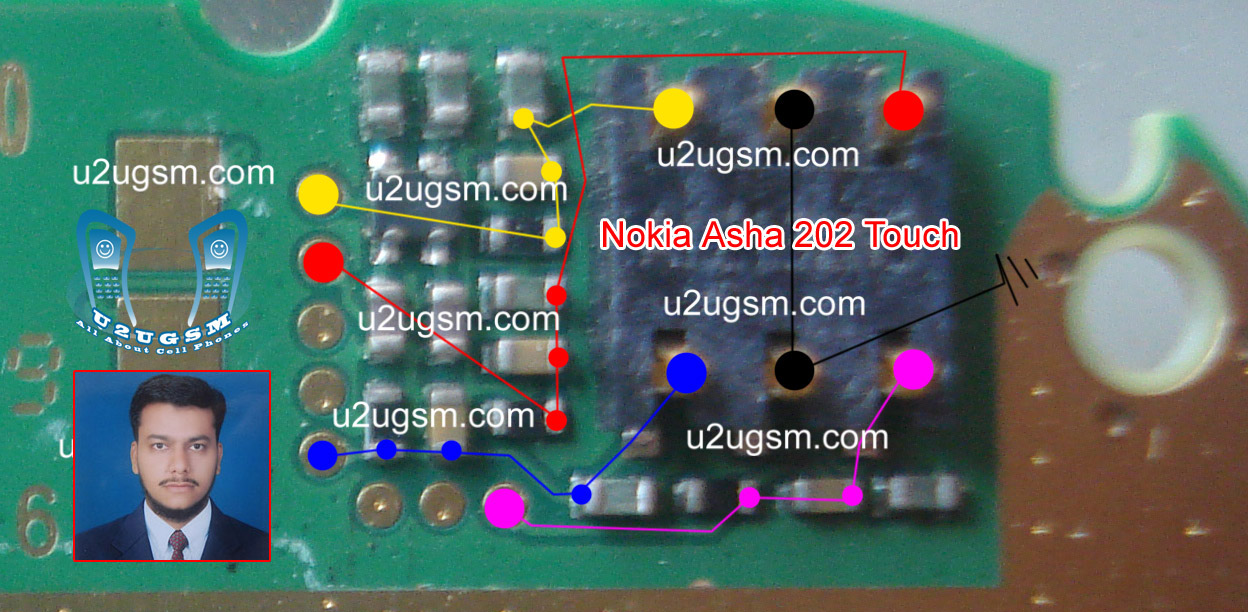
The above diagram contains some different color lines these are used for nokia asha 202 touchLcd function.You can find out if there is some rust carbon in it. Mother board can be water damage or may be you find out some burn parts in it.
In case of water damage clean the mother board and apply heat to make it dry. In case of burn or damage parts you can replace components.
Check all these tracks that are given in diagram for nokia asha 202 touchLcd problem solutions.Small circles in different colors are given so that you can find out points where you can apply jumpers and you can check these with meter.
If any link is broken apply jumpers to solve touch Lcd solution in nokia asha 202.
I all ready have posted an Nokia Asha 202 Touch Lcd IC problem solution you can check it also.
for more detail and new tips and tricks about cellphone service problem keep visiting this page we will update cellphone service diagrams timely with new cellphone diagrams.some related post are also given bellow you can read them also for more information about cellphone.
Thursday, October 2, 2014
Samsung Galaxy S3 Touch Screen Not Working Solution

Sunday, September 21, 2014
Samsung Nokia Symphony Display and Smart Phone iPhone iPad iPod Touch Screen Problem
Samsung, Nokia, Symphony Display and Smart Phone, iPhone, iPad, iPod Touch Screen Problem : Smart Phone, iPhone, iPad, iPod Touch Screen Problem and Samsung, Nokia, Symphony Display Troubleshooting is major problem in the world. Symphony Mobile User is increasing day by day. Symphony TAB is totally depended on touch. Samsung Galaxy, Samsung DUOS and S4 totally depended on Touch. There is no alternative way instead of Touch. So need proper care and secure using for Touch Mobile Phone. Smart Phone, iPhone, iPad, iPod also depended on touch. The generation of Touch Mobile is increasing like Notebook and Laptop. After Samsung and Symphony Nokia new mobile is also depended on touch. Although Nokia is still now far from generating Andriod operating system in their mobile. If Appears touch problem in your mobile you can take these necessary step as giving below :
1. Restart Your Mobile.
2. Flash Your Phone Memory Or Give Restore Factory Setting Reset.
3. Remove Memory Card Then Try Again.
4. Use Touch Protected Cover
5. If Your Problem Not Solved Then Try With Customer Care Center.
Read More..
1. Restart Your Mobile.
2. Flash Your Phone Memory Or Give Restore Factory Setting Reset.
3. Remove Memory Card Then Try Again.
4. Use Touch Protected Cover
5. If Your Problem Not Solved Then Try With Customer Care Center.
Saturday, September 13, 2014
N8 Touch Screen Not Working how to fix problem
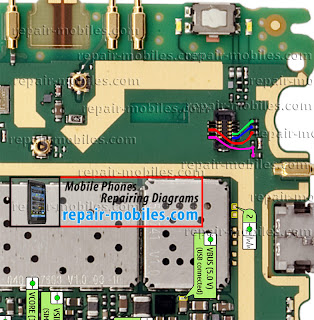
following article. If your phone's Touch Lcd stops working check
the diagram below for solution.
Replace the touch Lcd panel if touch Lcd is not working if you
have damaged Nokia N8 Touch Panel connector I have marked all the
Nokia N8 Touch Screen Panel Connector Ways in this diagram. Black
marked Jumper points are grounds. If you don't know how to dissemble
your phone read this guide Nokia N8 How To Dissemble Guide with
Diagrams.
Please Note that we will edit these solutions or add new ones if found
in this page at any time in the future. So feel free to come back any
time on this page to stay up to date.
If you have further Questions please don't hesitate to leave a comment.
Note: Every repairing solution posted here is tested by at least one
member of our team. Use the information available here at Your Own
Risk. We are not responsible if any harm comes to your device during
the repairing process.
Monday, September 8, 2014
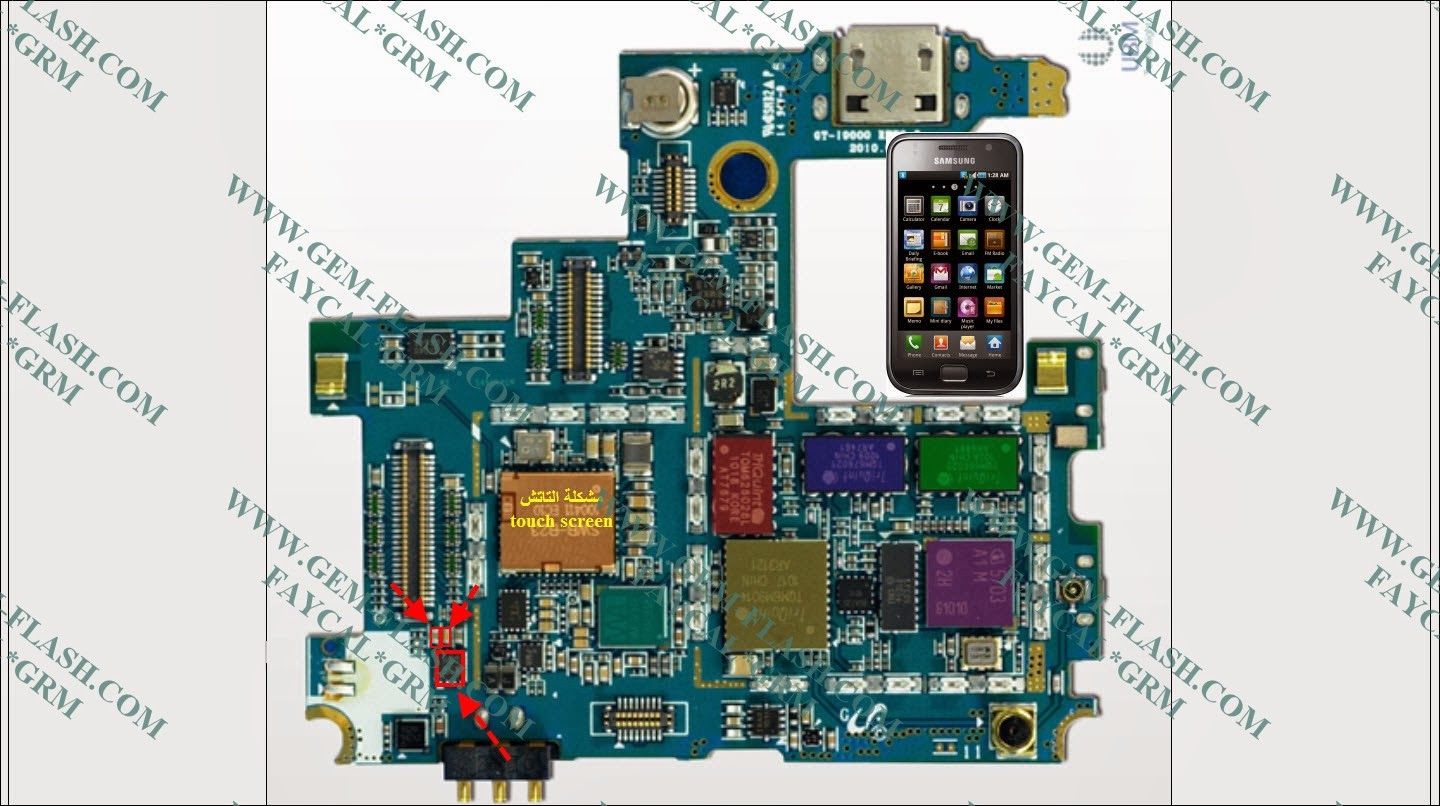
Samsung Galaxy S i9000 touch screen not working Solution
Tuesday, September 2, 2014
CWM Based Recovery 6 0 4 6 Touch Recovery for Xperia Z2 How To Guide
CWM-Based Recovery 6.0.4.6 Touch Recovery for Xperia Z2 How To Guide
info:This Recovery is built from CWM 6.0.4.6 sources!
I dont have this device with me and but would love to have one!...
all the testing was done remotely on users devices... thanks to @yeeson for testing on his Z2 !!![ PROOF ]![CWM-Based]()
[ credits / special thanks ]
I dont have this device with me and but would love to have one!...
all the testing was done remotely on users devices... thanks to @yeeson for testing on his Z2 !!![ PROOF ]
[ credits / special thanks ]
- Koush - for the brilliant work & coding on CWM recovery
- CyanogenMod and FreeXperia Team (especially jerpelea) for too many things *
- special thanks to @yeeson for helping out with testing and risking his devices for the sake of development!!! and NO, his phone was NOT damaged during testing
- ME for creating this for u guys!

[ Requirements ]
- Bootloader unlocked
- working fastboot
- STOCK ROM FW:
- 4.4.2
- 17.1.A.2.36 - v01
- 4.4.2
[ features ]
- standard CWM recovery 6.0.4.6 - TOUCH RECOVERY!
- kernel is insecure (ro.secure=0)
- adb debugging is enabled by default in OS
- TIP: if u are experiencing very slow backup in CWM do this
[ WARNING ]
for flashing this kernel you WILL NEED TO UNLOCK BOOTLOADER! Check this thread for more info (same steps as Xperia Z1 are used for Xperia Z2)
UNLOCKING BOOTLOADER WITHOUT TA BACKUP WILL LEAD TO IRREVERSIBLE LOSS OF DRM KEYS!!!
AND YES CAMERA STILL WORKS AFTER UNLOCKING BOOTLOADER!!!
[ known issues ]
for flashing this kernel you WILL NEED TO UNLOCK BOOTLOADER! Check this thread for more info (same steps as Xperia Z1 are used for Xperia Z2)
UNLOCKING BOOTLOADER WITHOUT TA BACKUP WILL LEAD TO IRREVERSIBLE LOSS OF DRM KEYS!!!
AND YES CAMERA STILL WORKS AFTER UNLOCKING BOOTLOADER!!!
[ known issues ]
- adb is not working in recovery (can be fixed later)
[ how to flash this kernel ] (via fastboot)
- download the kernel image
- save the boot.img to the folder containing fastboot binary
- flash the boot.img using fastboot:Code:reboot from fastboot Code:
fastboot flash boot boot.img
fastboot reboot
- the device should now start booting
- enjoy!
when you see the Sony logo and the LED light turns pink/amber/orange keep tapping/pressing VOLUME UP key
[ how to Root ]
for instructions on how to root please check this post
[ sources ]
https://github.com/DooMLoRD/android_device_sony_honami
for now recovery is same is same as honami
[ donations ]
Please do consider donating as I plan to get this device!
if u feel that this work has helped u OR u think that the work i put into making this is worthy of donations, then click on the following link for buying me some coffee/beer/etc

PAYPAL DONATION LINK
OR
you can buy one of my awesome apps from Play Store!
[ download links ]
PLEASE DO NOT MIRROR, REDISTRIBUTE, REPACK MY FILES
NEW:
Advance Stock Kernel with Recovery v01 (FW:17.1.A.2.36}
MD5HASH: 6e0c418d299780bd0ac74e69ff46a199
Subscribe to:
Posts (Atom)
