Showing posts with label jumper. Show all posts
Showing posts with label jumper. Show all posts
Tuesday, November 18, 2014


Monday, November 17, 2014
Nokia C1 02 Lcd Light Jumper Way Repair Solutions

Nokia C1-02 Lcd Light Jumper Way Repair Solutions
Saturday, November 15, 2014
Nokia 100 101 LCD Display Solution Jumper Ways

Nokia 100 101 LCD Display Solution Jumper Ways
Nokia 100 101 LCD Display Solution By Jumper
Nokia 100 101 LCD Display Solution
Nokia 100 101 LCD Display Problem
Thursday, November 13, 2014
Nokia X2 Battery Terminals Point Problem Jumper Ways
Nokia X2-00 Battery Terminal Points Damage Ways Problem Solution if in Nokia X2-00 during changing battery terminal points you have loss battery points then you can solve this problem with this diagram bellow posted in this post.

there are three different color lines in this post shows that how you can make jumpers so check these links with meter and if any of them is broken make these jumpers with insulation wire.this diagram can help you in case Nokia X2-00 is dead you can check these links so that battery crunt can pass through right ways and can be set on off.
for more detail and new tips and tricks about this problem keep visiting this page we will update it timely with new diagrams.some related post are also given bellow you can read them also for more information.
Read More..
there are three different color lines in this post shows that how you can make jumpers so check these links with meter and if any of them is broken make these jumpers with insulation wire.this diagram can help you in case Nokia X2-00 is dead you can check these links so that battery crunt can pass through right ways and can be set on off.
for more detail and new tips and tricks about this problem keep visiting this page we will update it timely with new diagrams.some related post are also given bellow you can read them also for more information.
Nokia 110 Not Charging Problem Solution Jumper Ways
when we plugin charging pin into charging jack of Nokia 110 and it do not shows any thing it can be fault of missing track or parts in it and can be fault of charging base.While if it shows not charging then it can be reason of water damages or low volt.so here is a diagram to help you to understand charging parts and there tracks.

look at above diagram and clean all these parts which are given in it.clean all these parts and apply hot air to dry the board.Check these parts with meter and if path is missing apply jumpers as given in above diagram solution.to Fix charging problem you can replace charging base also.Red line shows positive track of charging function while blue is a ground print.
for more detail and new tips and tricks about cellphone service problem keep visiting this page we will update daily this blog timely with other mobile solution.
Read More..
look at above diagram and clean all these parts which are given in it.clean all these parts and apply hot air to dry the board.Check these parts with meter and if path is missing apply jumpers as given in above diagram solution.to Fix charging problem you can replace charging base also.Red line shows positive track of charging function while blue is a ground print.
for more detail and new tips and tricks about cellphone service problem keep visiting this page we will update daily this blog timely with other mobile solution.
Wednesday, November 5, 2014
Nokia C2 02 Camera Standby Notworkin Problem Solution Jumper Ways
Nokia C2-02 Camera Problem, Nokia C2-02 Camera Standby Mode can be cause of water damage or breakage. To solve this problem in the mobile phone you can follow a few steps that i am going to describe in this post.

In first step restore factory setting in Nokia C2-02. Then make a full flash (software firmware) installation. And the third step is to check hardware diagnostic. After dis assembly of phone check the whole mother board carefully.If there is some rust or carbon on board then clean it with electronics cleaner and apply some heat with hot air. So that the mother board can be dry.
If mother board can not be full dry it can create carbon in future so keep in mind it should be dry.Do not apply much heat as it can harm your skin and mother board of cell phone.
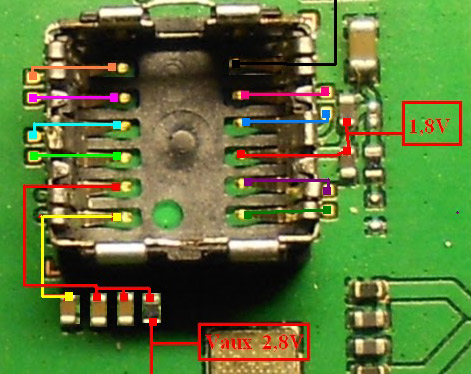
In above diagram as you can see there are different color lines. These lines are indicating tracks that are used in camera function so check these paths and apply jumpers as shown in above diagram.
for more detail and new tips and tricks about cellphone service problem keep visiting this page we will update daily this blog timely with other mobile solution.
In first step restore factory setting in Nokia C2-02. Then make a full flash (software firmware) installation. And the third step is to check hardware diagnostic. After dis assembly of phone check the whole mother board carefully.If there is some rust or carbon on board then clean it with electronics cleaner and apply some heat with hot air. So that the mother board can be dry.
If mother board can not be full dry it can create carbon in future so keep in mind it should be dry.Do not apply much heat as it can harm your skin and mother board of cell phone.
In above diagram as you can see there are different color lines. These lines are indicating tracks that are used in camera function so check these paths and apply jumpers as shown in above diagram.
for more detail and new tips and tricks about cellphone service problem keep visiting this page we will update daily this blog timely with other mobile solution.
nokia 101 insert sim problem jumper solution
To solve nokia 101 insert sim problem jumper solution this post will help you very much. This diagram will teach you how simply and easily you can sol insert sim problem in nokia 101.

same as jumpers are given in above diagram you can apply on the mother board and you can solve insert sim problem in nokia 101 with a few jumpers. all jumper point are given in different colors so tat you can identify them easlily.
same as jumpers are given in above diagram you can apply on the mother board and you can solve insert sim problem in nokia 101 with a few jumpers. all jumper point are given in different colors so tat you can identify them easlily.
Nokia 111 Local Test Mode Problem Solution Jumper Solution
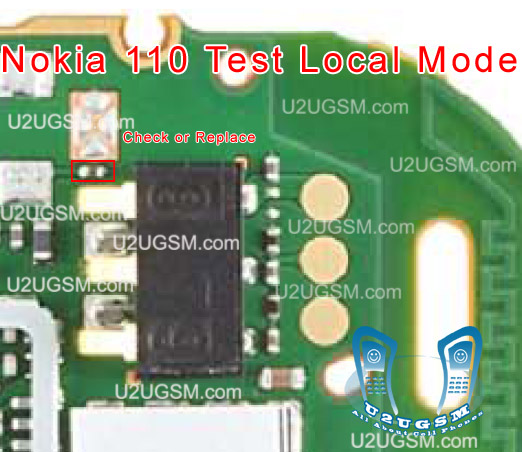 some time we get test mode local problem in our mobile display and in this case we can not use cell Nokia 2323 Classic Insert sim problem solution ways jumper
 phone keypad and other functions.if you have same problem then diagram bellow will help you to solve
this problem. In above diagram you can see a red line box to show the exact location of resistance
which is used in problem solution of test mode in nokia 111.
Once phone has been disassembled you can clean whole mother board for rust or carbon.Leave it to dry
and apply hot air.Replace indicated resistance and also check components behind battery terminals.
Sunday, November 2, 2014
Nokia N92 Full Keypad Solution With keypad IC Jumper Ways solution
Heres a full keypad solution that may useful and possibly help fix and repair Nokia N92 keypad problem or failure. If any certain keys will not been able to function this solution will show you each keypad keys line tracks and connections, including the keypad filter IC that may also cause the keypad keys failed to function if damaged or faulty.

There are two keypad ESD filter is being used on the keypad circuit of Nokia N92, (see solution above).
The small keypad IC holds the volume UP and DOWN control and the Camera Shutter button, and some group of keys.
The bigger one holds all the keypad keys, if this keypad filter IC is damaged all of the key will not respond or unable to function. By only replacing it with a new one will only possibly fix or repair the keypad problem on Nokia N92.
Nokia N92 Keypad Keys Malfunction Solution

Nokia N92 keypad IC jumper ways
The small keypad IC holds the volume UP and DOWN control and the Camera Shutter button, and some group of keys.
The bigger one holds all the keypad keys, if this keypad filter IC is damaged all of the key will not respond or unable to function. By only replacing it with a new one will only possibly fix or repair the keypad problem on Nokia N92.
Wednesday, October 29, 2014
Nokia N78 keypad malfunction solution with keypad filter IC jumper ways solution
Heres a solution that may help fix and repair Nokia N78 keypad failure or malfunction. If you already tried to replace the keypad flex cable but the problem still exists, this solution below will show you the keypad filter IC that is being connected to eah particular keys within the keypad matrix.
Nokia 2710NE Memory Card Solution - MicroSD Card not detected problem repair solution
 You may trace each particular line paths for deep keypad repair troubleshooting.
Nokia 2710NE Memory Card Solution - MicroSD Card not detected problem repair solution
N78 Keypad Filter IC connection tracks

nokia C5 06 Mic problem solution jumper ways
If mic is not working in Nokia C5-06.You are facing Low mic voice or no mic voice problem.All these problems can be fix with a few tips and tricks that are given in this post.
nokia Asha 202 Not charging problem solution jumpers

If you found some rust carbon or water damages then it can also be cause of Nokia C5-06 mic problem to solve and fix mic problem in Nokia C5-06 clean all the rust and carbon with electronics cleaner and apply hot air to make it dry.
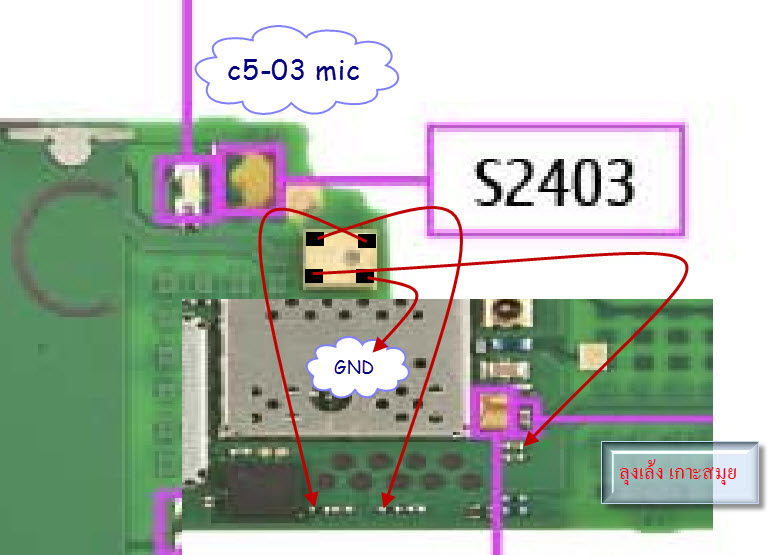
In above diagram you can see a mic ( microphone ) and some red color lines. These lines are pointing the parts that are used in microphone mic functions in Nokia C5-06.
Check all these tracks and paths with meter and if any of them is missing apply jumpers as shown in above diagram.
for more detail and new tips and tricks about cellphone service problem keep visiting this page we will update cellphone service diagrams timely with new cellphone diagrams.some related post are also given bellow you can read them also for more information about cellphone.
Read More..
nokia Asha 202 Not charging problem solution jumpers
If you found some rust carbon or water damages then it can also be cause of Nokia C5-06 mic problem to solve and fix mic problem in Nokia C5-06 clean all the rust and carbon with electronics cleaner and apply hot air to make it dry.
In above diagram you can see a mic ( microphone ) and some red color lines. These lines are pointing the parts that are used in microphone mic functions in Nokia C5-06.
Check all these tracks and paths with meter and if any of them is missing apply jumpers as shown in above diagram.
for more detail and new tips and tricks about cellphone service problem keep visiting this page we will update cellphone service diagrams timely with new cellphone diagrams.some related post are also given bellow you can read them also for more information about cellphone.
Monday, October 27, 2014
Nokia 1280 Keypad Problem Solution Jumper Ways
Here a full solution for Nokia 1280 keypad problem. If encountered keypad failure on nokia 1280 the solution below might help fix and solve the problem, for it shows the complete connection line paths of each particular on nokia 1280 keyboard matrix.
The iner and outer key connection were all highlighted for easy tracks or tracing and check up procedures.
 There is a keypad controller chip that is mounted at the middle of the Nokia 1280 PCB board. If this chip become faulty or damaged, will totally result to keypad failure or malfunction. You may need to rework or replace the keypad controller chip if each of the connection line paths were all both okay.
The iner and outer key connection were all highlighted for easy tracks or tracing and check up procedures.
Nokia 1280 Keypad Problem Solution - Jumper Ways

Friday, October 17, 2014
Nokia X2 02 Speaker problem solution jumper ways
Nokia X2-02 speaker problem, Nokia X2-02 earpiece jumper ways, Nokia X2-02 mic is not working, Nokia X2-02 speaker jumpers, speaker is not working or low voice and noise.

If Nokia X2-02 speaker has low voice or nosie it can be problem of speaker ear piece. If no voice in it that may can be cause of missing or damage parts. The noise can also be due to water damages in Nokia X2-02.
If speaker is not working or have a low voice it can be fault of speaker and housing. Check Nokia X2-02 housing ( body ). All housing have a small whole at the point of ear piece. In some cases rust or dust cover this point and the voice can not reach proper to the mic point so make it clean if there is some dust on it.
After disassambly of Nokia X2-02 look at the motherboard for rust carbon or burren parts. If you found some rust or carbon apply electronics cleaner on the mother board and apply hot air to make it dry proper.
Applying too much heat can damage the mother board and parts.It also can be harm for your skin.So keep in mind about normal heat flow when making it dry.Nokia X2-05 Ringer Problem Solution Jumper Ways
Check all these tracks that are provided in above diagram to solve speaker problem in Nokia X2-02. In diagram two different color lines are given to identify all parts that are used to solve Nokia X2-02 speaker problem with jumpers.
If some parts are missing or damage apply jumper on these points where small circles are pointing in nokia mic repairing diagram above.
If Nokia X2-02 speaker has low voice or nosie it can be problem of speaker ear piece. If no voice in it that may can be cause of missing or damage parts. The noise can also be due to water damages in Nokia X2-02.
If speaker is not working or have a low voice it can be fault of speaker and housing. Check Nokia X2-02 housing ( body ). All housing have a small whole at the point of ear piece. In some cases rust or dust cover this point and the voice can not reach proper to the mic point so make it clean if there is some dust on it.
After disassambly of Nokia X2-02 look at the motherboard for rust carbon or burren parts. If you found some rust or carbon apply electronics cleaner on the mother board and apply hot air to make it dry proper.
Applying too much heat can damage the mother board and parts.It also can be harm for your skin.So keep in mind about normal heat flow when making it dry.Nokia X2-05 Ringer Problem Solution Jumper Ways
Check all these tracks that are provided in above diagram to solve speaker problem in Nokia X2-02. In diagram two different color lines are given to identify all parts that are used to solve Nokia X2-02 speaker problem with jumpers.
If some parts are missing or damage apply jumper on these points where small circles are pointing in nokia mic repairing diagram above.
Nokia X2 05 On Off Power Button Jumper Ways Problem Solution
Nokia X2-05 is not getting power On and it can make charging. It is 100% fault of on off button in it.because On Off button on keypad is not working so that it will not be able to power On.
After disassambly of Nokia X2-05 look at the motherboard for rust carbon or burren parts. If you found some rust or carbon apply electronics cleaner on the mother board and apply hot air to make it dry proper.
Applying too much heat can damage the mother board and parts.It also can be harm for your skin.So keep in mind about normal heat flow when making it dry.Nokia X2-05 Mic problem solution jumper ways

Nokia X2-05 power button On Off switch not working ways jumpers.Replace battery and check if mobile can not be switch On dis assemble the phone and check power switch button ways as given in above diagram.If any print out of these is missing apply jumpers to solve On Off Button problem in Nokia X2-05 .
for more detail and new tips and tricks about cellphone service problem keep visiting this page we will update cellphone service diagrams timely with new cellphone diagrams.some related post are also given bellow you can read them also for more information about cellphone.
After disassambly of Nokia X2-05 look at the motherboard for rust carbon or burren parts. If you found some rust or carbon apply electronics cleaner on the mother board and apply hot air to make it dry proper.
Applying too much heat can damage the mother board and parts.It also can be harm for your skin.So keep in mind about normal heat flow when making it dry.Nokia X2-05 Mic problem solution jumper ways
Nokia X2-05 power button On Off switch not working ways jumpers.Replace battery and check if mobile can not be switch On dis assemble the phone and check power switch button ways as given in above diagram.If any print out of these is missing apply jumpers to solve On Off Button problem in Nokia X2-05 .
for more detail and new tips and tricks about cellphone service problem keep visiting this page we will update cellphone service diagrams timely with new cellphone diagrams.some related post are also given bellow you can read them also for more information about cellphone.
Tuesday, October 14, 2014
Nokia C2 01 Power END key Jumper Ways
Nokia C2-01 Power/END key Jumper Ways
nokia c2-03 power button not working
nokia c2-01 on off jumper
nokia c2-03 on off track
Nokia c2-03 power problem
nokia c2-03 on off switch ways
nokia c2-01 on off ways
nokia c2-03 power solution
nokia c2-03 on off problem
nokia c2-03 call button not working
nokia c2-01 no power

If the Nokia C2-01 shows charging indication when the battery charger is plug-in, but unable to turn ON. This problem is cause by a faulty power ON-OFF key . Fixing it is quite so easy, you mat first try to clean the PCB board’s keypads matrix and the keypad membrane.
If the keypads mats is cleaned and doesn’t solve the problem, refer to the solution below and trace the power/end key connection line paths.
nokia c2-03 power button not working
nokia c2-01 on off jumper
nokia c2-03 on off track
Nokia c2-03 power problem
nokia c2-03 on off switch ways
nokia c2-01 on off ways
nokia c2-03 power solution
nokia c2-03 on off problem
nokia c2-03 call button not working
nokia c2-01 no power
If the Nokia C2-01 shows charging indication when the battery charger is plug-in, but unable to turn ON. This problem is cause by a faulty power ON-OFF key . Fixing it is quite so easy, you mat first try to clean the PCB board’s keypads matrix and the keypad membrane.
If the keypads mats is cleaned and doesn’t solve the problem, refer to the solution below and trace the power/end key connection line paths.
Thursday, September 25, 2014
Nokia C2 03 C2 06 C2 08 Memory Not Detected Solution MMC IC Jumper Tracks Ways
Heres another solution that covers for Nokia C2-03, C2-06, C2-08 memory card not detected problem cause by wet damaged or any possible causes like oxidation build ups etc.The Nokia C2-03, C2-06 and C2-08 slider phone has designed with a built in ESD and EMI filter chip that protects the system circuit if theres something went wrong from the memory card. In most Nokia PCB design this chips were also found and called as "MMC filter IC". So, in troubleshooting Memory card not detected problem mostly it can be fix by replacing the said MMC IC.
Heres some hints on how to fix Nokia C2-03, Nokia C2-06 or Nokia C2-08 Dual SIM card, slider phone with touch and type features.
1) If memory card is not detected error shows, try to use another working memory card. The memory card might be corrupt or already damaged.
2) Check for possible damaged and or clean the memory card connector pins and its surroundings components on the PCB board.
3) Check the firmware, reflash, restore or update to latest version if necessary.
4) Check, resolder, rework or replace the memory card filter chip (MMC filter IC)
Heres some hints on how to fix Nokia C2-03, Nokia C2-06 or Nokia C2-08 Dual SIM card, slider phone with touch and type features.
1) If memory card is not detected error shows, try to use another working memory card. The memory card might be corrupt or already damaged.
2) Check for possible damaged and or clean the memory card connector pins and its surroundings components on the PCB board.
3) Check the firmware, reflash, restore or update to latest version if necessary.
4) Check, resolder, rework or replace the memory card filter chip (MMC filter IC)
| Nokia C2-03, C2-06, C2-08 Memory Not Detected Solution |
Tuesday, September 23, 2014

Saturday, September 20, 2014
Nokia 205 sim problem jumper solution
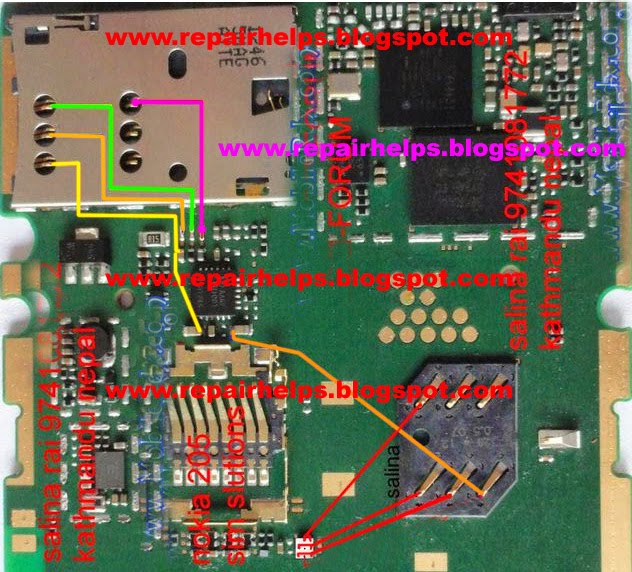
Here is solution of nokia asha 205 insert sim problems solution.This phone is dual sim so now showing dual simways and jumper solution.
Tuesday, September 16, 2014
Samsung S7330 Sim Ways Jumper Solution

Subscribe to:
Posts (Atom)
